


Projected Capacitive Touch Screen Technology: Working Principles and Design Details
Understanding how projected capacitive (PCAP) touch screen technology works is essential for engineers and product managers who need to select the right touch solution for industrial and embedded systems.
Many people assume that all capacitive touch screens behave the same, but differences in sensor structure, controller design, and communication protocol can lead to significant variations in performance, reliability, and long-term stability.
This article focuses on the technical foundations of PCAP technology, helping you connect the selection criteria from the previous guide to a deeper understanding of how touch panels actually function.
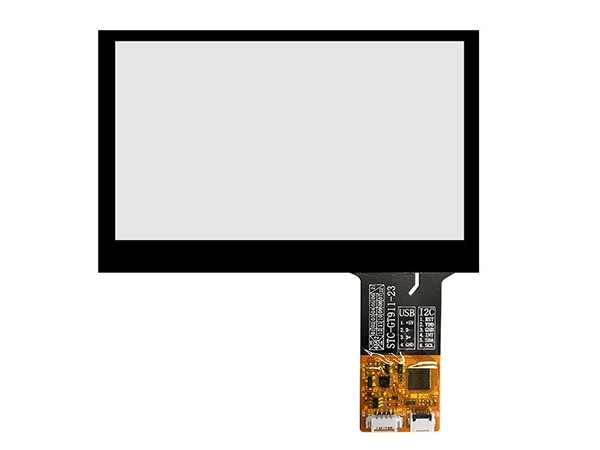
How Projected Capacitive Touch Works
Basic Working Principle
Projected capacitive touch screens form a grid of electrostatic fields across the surface of the panel. When a conductive object, such as a finger, touches the screen, it disturbs these fields, and the controller detects the change.
This method supports multi-touch detection, fast response, and high accuracy, which are critical for industrial HMI, medical devices, and embedded displays.
Self Capacitance vs Mutual Capacitance
- Self capacitance: Each electrode measures its own capacitance change; simpler but limited multi-touch performance
- Mutual capacitance: X and Y electrodes form a grid; supports true multi-touch and more accurate positioning
- Modern industrial PCAP panels almost always use mutual capacitance for better performance
Why Controller Design Matters
The touch controller is the core component that interprets field changes and converts them into touch coordinates. A well-designed controller can:
- Filter noise from motors, power supplies, and other EMI sources
- Distinguish fingers from gloves, water, or dust
- Support multi-touch gestures and fast update rates
Sensor Layer Structure Explained
X and Y Electrode Grid
The touch sensor layer typically consists of transparent conductive patterns (often ITO) arranged as an X and Y electrode grid. This grid creates the electrostatic field matrix that the controller monitors.
ITO Material and Transparency
ITO (Indium Tin Oxide) is commonly used because:
- It provides high optical transparency
- It has good electrical conductivity
- It can be patterned into precise electrode grids
Glass and Film Integration
In G+G structures, the sensor can be embedded inside the glass or bonded as a separate layer. In G+F structures, it is usually integrated into a thin film that is then bonded to the cover glass.
The choice affects:
- Total thickness
- Touch sensitivity
- Impact resistance and durability
Controller and Signal Processing
Signal Sampling and Noise Filtering
The controller continuously samples the electrode grid and compares each measurement to a baseline. Deviations beyond a threshold are interpreted as touch events.
Key signal processing tasks include:
- Baseline tracking to adapt to temperature and humidity changes
- Noise suppression from EMI and power-line interference
- Touch event filtering to reduce jitter and false triggers
Multi-Touch Detection Logic
Multi-touch detection relies on solving a matrix of X and Y intersections. Advanced controllers use algorithms to:
- Identify multiple touch points simultaneously
- Track finger movement and gestures
- Distinguish real touches from spurious signals
GT911 and Similar Controller Families
Controllers like the GT911 from Goodix are widely used in industrial and embedded touch panels. They support:
- USB and I2C communication protocols
- Multi-touch with up to 10 or more touch points
- Configurable touch sensitivity and reporting rates
These features make them suitable for applications ranging from industrial HMI to smart display modules.
Factors Affecting Touch Performance
Cover Glass Thickness and Touch Sensitivity
Thicker cover glass increases durability but reduces the strength of the electrostatic coupling. This means the controller must be tuned to maintain accurate touch detection.
- Thin glass (e.g., 0.5–1.1 mm): higher sensitivity, lower impact resistance
- Thick glass (e.g., 2–5 mm): better durability, requires stronger signal and careful tuning
Water, Humidity, and Condensation
Water droplets or high humidity can create false touch signals by altering the local electric field. Good controller designs implement:
- Water rejection algorithms
- Dynamic threshold adjustment
- Surface treatments (e.g., hydrophobic coatings) to reduce water retention
Glove Operation and Touch Sensitivity
Gloves are less conductive than bare fingers, so they cause smaller field changes. Panels designed for glove operation typically feature:
- Higher signal gain and sensitivity tuning
- Special algorithms to detect weaker touch events
- Optimized sensor patterns for better coupling
Integration with Display Modules
Touch Panel and TFT LCD Integration
In most industrial displays, the touch panel is integrated with a TFT LCD module. The integration process considers:
- Optical alignment between touch sensor and display area
- Total module thickness and stack-up design
- Electrical isolation to avoid interference between touch and display signals
Optical Bonding Considerations
When optical bonding is used (to reduce glare and improve durability), the touch panel must:
- Support bonding adhesive compatibility
- Maintain touch sensitivity after bonding
- Resist stress from temperature cycles and mechanical loads
Comparison of PCAP and Other Touch Technologies
| Technology | Multi-Touch | Durability | Optical Quality | Typical Use |
|---|---|---|---|---|
| Projected Capacitive (PCAP) | Yes | High (especially G+G) | High transparency | Industrial HMI, medical, embedded |
| Resistive Touch | Limited | Medium | Slightly lower clarity | Legacy industrial panels |
| Surface Acoustic Wave (SAW) | Limited | Medium | Moderate | Public information displays |
Case Study
An embedded industrial display manufacturer faced unstable touch behavior in a high-EMI environment with nearby motor drives and power converters.
Challenge: The original touch panel used a basic controller with limited noise filtering, leading to frequent false touches and missed inputs when the system was under load.
Solution: RONDELI Display replaced the panel with a PCAP touch solution using a GT911-based controller, enhanced ground shielding, and EMI-tuned signal processing. The USB interface was also reconfigured to reduce noise coupling.
Result: Touch stability improved significantly, false touches were eliminated under normal operating conditions, and the system achieved consistent multi-touch performance even in harsh industrial environments.
Client Testimonial
A European automation integrator reported that after switching to a PCAP touch panel with better controller design and EMI shielding, their industrial kiosks showed far more stable touch behavior. Debugging time dropped, and customer complaints about unresponsive areas disappeared.
FAQs
What is the difference between PCAP and resistive touch?
PCAP uses an electrostatic field grid and supports multi-touch with high accuracy, while resistive touch relies on pressure and typically supports only single-touch with lower optical quality.
Why do some panels support both USB and I2C?
USB and I2C are two different communication protocols. USB is easier to integrate in standard PCs, while I2C is more suitable for compact embedded systems with limited bandwidth.
Can a PCAP touch screen work with thick cover glass?
Yes, but it requires careful controller tuning and possibly higher signal gain. The trade-off is between durability and touch sensitivity.
How does a controller handle water on the screen?
Advanced controllers use water rejection algorithms that detect the shape and signal pattern of water droplets and ignore them as false touches.
Is GT911 a common controller for industrial touch panels?
Yes, GT911 from Goodix is widely used in industrial and embedded touch panels due to its multi-touch support, flexible interface options, and robust noise handling.
How This Connects to Touch Selection and Application
Understanding PCAP technology helps you apply the selection criteria from the first article more effectively. When you know how the sensor, controller, and interface work, you can make more informed decisions about structure, EMI resistance, and glove operation.
If you want to explore how these touch technologies are implemented in real display modules, you can refer to the main product overview: capacitive touch screen modules.
Why RONDELI Display PCAP Technology and Integration Stands Out
RONDELI Display specializes in integrated PCAP touch and display solutions with strong engineering support for industrial, medical, and automotive applications. Their touch panels include options with different cover glass thicknesses, interface types (USB, I2C), and controller designs such as GT911-based solutions.
In PCAP touch screen technology scenarios, RONDELI Display provides:
- Mutual capacitance PCAP designs with optimized X/Y electrode grids
- USB and I2C interface support for flexible integration into embedded systems
- Controllers tuned for EMI resistance, water rejection, and glove operation
- Strict quality control and certifications aligned with ISO9001, IATF16949, and ISO13485
This makes their PCAP solutions particularly suitable for projects that require stable multi-touch performance and long-term reliability in demanding environments.
Authoritative Sources
“Projected Capacitive Touch Technology Overview”
https://www.ti.com/lit/an/spra959/spra959.pdf
“Introduction to Touch Sensing Technologies”
https://www.analog.com/en/technical-articles/2016/09/27/13/22/introduction-to-touch-sensing-technologies.html
“Electromagnetic Compatibility for Embedded Systems”
https://www.nist.gov/publications/electromagnetic-compatibility-handbook
“Goodix GT911 Touch Controller Datasheet”
https://www.goodix.com/downloader.aspx?id=104