


Capacitive Touch Screen Selection Guide for Industrial and Embedded Applications
Choosing the right capacitive touch screen is not simply a matter of size or resolution. In industrial and embedded environments, the selection process directly impacts system stability, long-term reliability and user interaction accuracy.
Unlike consumer electronics, industrial applications often involve harsh environments, glove operation, electromagnetic interference and long lifecycle requirements. A poorly selected touch panel can result in signal instability, inaccurate touch response or even system failure.
This guide is designed for engineers, product managers and procurement specialists who need a structured way to evaluate capacitive touch solutions across different application scenarios.
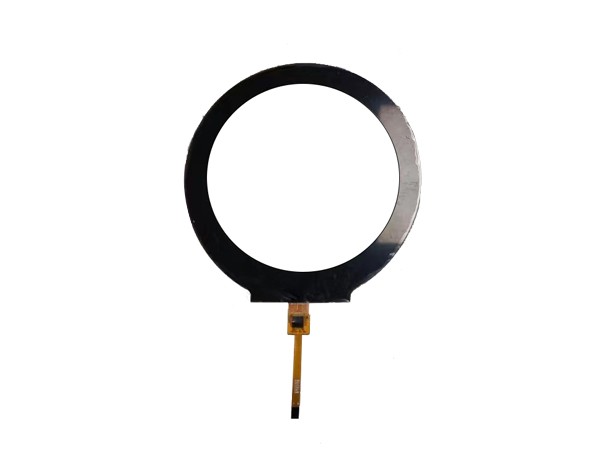
Understanding Capacitive Touch Technology in Practice
Core Working Principle
Capacitive touch screens detect changes in electrostatic fields caused by conductive objects such as fingers. Projected capacitive (PCAP) technology is a widely used solution in modern industrial displays because of its multi-touch capability and durability.
Key Structural Variants
- G+G (Glass + Glass): High durability and optical clarity for demanding environments.
- G+F (Glass + Film): Lower cost and lighter weight for consumer or semi-industrial applications.
- G+F+F: A flexible structure often used in cost-sensitive applications.
Why Structure Matters
The selected touch structure affects impact resistance, optical performance, touch sensitivity and long-term reliability. Medical devices, for example, may prefer G+G structures because they can require frequent cleaning and exposure to demanding operating conditions.
Interface and Controller Selection Logic
Common Interface Types
- IIC (I²C): Suitable for compact embedded systems with limited bandwidth.
- USB: Plug-and-play and widely used in industrial PCs, tablets and evaluation setups.
- UART: Less common, but used in certain legacy or application-specific systems.
Controller Considerations
The touch controller plays an important role in touch accuracy, noise resistance and multi-touch performance. Controllers such as GT911 can be used in certain touch-panel configurations, but controller selection should always be confirmed against the panel design and host-board requirements.
Selection Tips
- Use USB when rapid integration and initial testing are priorities.
- Choose IIC for compact embedded systems where board space and resource use are important.
- Confirm controller compatibility with the mainboard, operating system and software driver plan.
Comparison of Key Selection Factors
| Factor | Industrial Requirement | Typical Option |
|---|---|---|
| Structure | High durability | G+G |
| Interface | Stable communication | USB or IIC |
| Surface | Reduced reflection and fingerprints | AG or AF coating |
| Touch Points | Multi-touch input | PCAP with 5 or more touch points |
| Environment | EMI resistance | Shielded design |
Application-Driven Selection Strategy
Medical Devices
- May require anti-glare glass for improved readability.
- May need reliable operation with gloves.
- Require stable performance under frequent cleaning and repeated use.
Industrial Control Panels
- Need strong resistance to electrical noise and EMI.
- Often require thicker cover glass or a protected front surface.
- May require long lifecycle support for industrial equipment.
Consumer Electronics
- Often focus on cost-performance balance.
- May prioritize slim and lightweight structures.
- Usually use standard touch performance for familiar user interactions.
Engineering Considerations Often Overlooked
Cover Glass Thickness
Thicker cover glass can improve front-surface durability, but it may reduce touch sensitivity. Controller tuning and touch-sensor design should be reviewed as part of the complete front assembly.
Optical Bonding Compatibility
If the display uses optical bonding, the touch panel and front assembly should be evaluated for low reflectivity, high transparency and adhesive compatibility.
Environmental Testing
Depending on the intended product environment, the touch solution may need validation for:
- Temperature cycling.
- Humidity resistance.
- ESD protection.
- EMI and EMC performance.
Case Study: Touch Interface for a Medical Device
A medical equipment manufacturer required a reliable touch interface for a portable diagnostic device.
Challenge: The device had to operate in high-humidity environments and support input with latex gloves while maintaining visibility under strong lighting conditions.
Solution: RONDELI Display implemented a G+G capacitive touch panel with an anti-glare coating and optimized controller sensitivity for glove operation. Additional EMI shielding was integrated into the design.
Result: The final device achieved stable touch performance across varying environments, reducing input errors and improving user interaction consistency.
Client Feedback
A European industrial automation integrator reported that, after switching to a properly specified capacitive touch solution, system downtime caused by input failures decreased significantly. Improved EMI resistance and stable USB communication simplified integration and reduced debugging time.
Frequently Asked Questions
What is the most important factor in capacitive touch screen selection?
The application environment is a primary factor. Industrial use requires durability, EMI resistance and stable controller performance rather than selection based only on cost or appearance.
Is USB better than IIC for touch screens?
USB is often easier to integrate and test in standard systems, while IIC can be more suitable for compact embedded designs with limited resources. The right choice depends on the host board, operating system and integration requirements.
How do I choose between G+G and G+F?
G+G can be suitable for industrial and medical applications that require higher strength and durability. G+F may be considered for projects where lower weight or cost is a higher priority.
Can capacitive touch screens work with gloves?
Yes, but glove operation depends on the touch-panel design, cover structure, controller tuning and sensitivity settings. Not all panels support reliable glove operation without configuration and validation.
How important is anti-glare coating?
Anti-glare treatment can improve readability in outdoor or high-light environments by reducing surface reflection. The final optical performance should be evaluated with the selected cover lens and device enclosure.
How This Connects to Full Display Integration
Touch selection is only one part of the complete display system. Factors such as TFT panel type, resolution, brightness, display interface and optical bonding also affect the final user experience and integration result.
For a broader overview of available touch display solutions, visit the LCD Touch Screen product range.
RONDELI Display Capacitive Touch Solutions
RONDELI Display provides integrated touch and display solutions for industrial, medical, automotive and embedded applications. Available options include capacitive touch panels with different structural designs, interface configurations and controller-integration requirements.
- G+G and customized touch structures for demanding environments.
- USB and IIC interface options for different integration needs.
- Display and touch solutions for medical, industrial-control and embedded systems.
- Quality processes aligned with ISO 9001, IATF 16949 and ISO 13485 requirements.
For projects that require reliable touch performance, share your display size, cover-glass, interface, operating environment and integration requirements with the RONDELI Display team.
Authoritative Sources
Capacitive Touch Sensing Overview
https://www.ti.com/lit/an/sloa132/sloa132.pdf
Human Interface Guidelines for Touch Devices
https://developer.apple.com/design/human-interface-guidelines/touch-interactions
Electromagnetic Compatibility Engineering Basics
https://www.nist.gov/publications/electromagnetic-compatibility-handbook
Glove-Compatible Touchscreen Technology Study
https://ieeexplore.ieee.org/document/7467408